 Nuclear Option Server Hosting
Keep the war going after the host logs off: an always-on Nuclear Option server in İstanbul with a mission rotation you control.
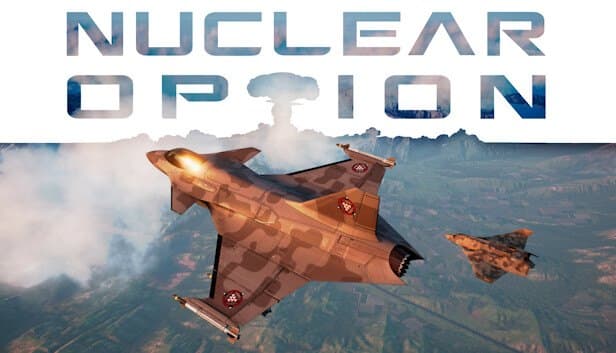
Choose your Game Server
Select from our wide range of optimized game servers. Each server is configured for maximum performance and comes with DDoS protection.
1. Plan Type
2. Location
3. Choose Plan

Bronze 4GB
Silver 6GB
Gold 8GB
Platinum 10GB
Diamond 12GB
Emerald 16GB
Xtreme 32GB
Which Nuclear Option Plan Is Right for You?
Compare recommended use, plan hardware and monthly prices.
| Plan | Recommended for | Hardware | Monthly price |
|---|---|---|---|
| Bronze 4GB | Recommended: private squadron, up to 8Fine for small groups and mission testing; CPU headroom gets tight in busy PvP. | 4 vCore Ryzen 9950X · 4 GB DDR5 6000MHz · 50 GB NVMe SSD Samsung 990 PRO | ₺240.00/mo |
| Silver 6GB | Recommended: up to 16, built-in missionsSolid start for an Escalation and Terminal Control rotation at the default 16-player cap. | 4 vCore Ryzen 9950X · 6 GB DDR5 6000MHz · 60 GB NVMe SSD Samsung 990 PRO | ₺345.00/mo |
| Gold 8GB | Full 16-player server plus WorkshopComfortable margin for public servers mixing built-in and Workshop missions. | 4 vCore Ryzen 9950X · 8 GB DDR5 6000MHz · 70 GB NVMe SSD Samsung 990 PRO | ₺440.00/mo |
| Platinum 10GB | Beyond 16 players, busy missionsFor unit-heavy community missions and big lobbies that accept the performance warning. | 4 vCore Ryzen 9950X · 10 GB DDR5 6000MHz · 100 GB NVMe SSD Samsung 990 PRO | ₺530.00/mo |
| Diamond 12GB | Crowded PvP and long rotationsExtra buffer for event servers running many Workshop missions with more than 16 pilots. | 4 vCore Ryzen 9950X · 12 GB DDR5 6000MHz · 110 GB NVMe SSD Samsung 990 PRO | ₺617.50/mo |
| Emerald 16GB | Very crowded, heavy missionsSix vCores add processing headroom for the densest scenarios; most squadrons won't need it. | 6 vCore Ryzen 9950X · 16 GB DDR5 6000MHz · 120 GB NVMe SSD Samsung 990 PRO | ₺840.00/mo |
| Xtreme 32GB | More than most communities needThe limit in this game is the CPU; 32 GB of memory won't lighten the per-frame load. | 12 vCore Ryzen 9950X · 32 GB DDR5 6000MHz · 200 GB NVMe SSD Samsung 990 PRO | ₺1520.00/mo |
Why TheCrewHost for Nuclear Option?
The CPU headroom, file access and network protection a Nuclear Option server needs while it simulates flight physics, missiles and ground forces at the same time.
Shockfront's official server tool
Your server runs Nuclear Option Dedicated Server, the tool the developer publishes on Steam. Players get a real dedicated server configured with the settings Shockfront documents.
Every rule in one file
ServerName, Password, MaxPlayers, RotationType and MissionRotation all sit in DedicatedServerConfig.json. Edit it in the file manager, restart, and fly under the new rules.
Workshop missions by ID
Add a rotation entry in the Workshop group with the published file ID as its Name, and the server downloads the mission itself. Your own editor missions go into MissionDirectory.
A CPU for crowded skies
Every aircraft is simulated across dozens of aerodynamic surfaces, and missiles plus land and naval units add to the bill. The Ryzen 9 9950X's single-core speed carries that load frame by frame.
Cover for a listed server
Any server in the public list can become a target. Free DDoS protection filters attack traffic aimed at your game and query ports, so pilots don't drop out mid-sortie.
Help when the JSON breaks
Server won't boot because of a missing comma, or a Workshop mission won't enter the rotation? Reach our team 24/7 by ticket, live chat, Discord, WhatsApp or phone.
Nuclear Option server hosting at TheCrewHost starts at $6.00 a month (₺240.00) for a server built from Shockfront Studios' official Nuclear Option Dedicated Server tool, running on Ryzen 9 9950X hardware in İstanbul. No more relying on one pilot to host from their own PC and ending the fight when they log off. You set up the mission rotation in DedicatedServerConfig.json, mixing built-in scenarios such as Escalation and Terminal Control with your own editor missions and Steam Workshop missions added by published ID. Ban lists, vote-kick rules and an optional password live in that same file.
What can you run on a Nuclear Option dedicated server?
A Nuclear Option server hosts multiplayer missions for Shockfront Studios' combat flight game set on a near-future battlefield. The game has 13 flyable aircraft, including fighters, bombers, helicopters and support planes. Pilots fight land, sea and air threats with realistic flight physics, and as a battle escalates, nuclear weapons come into play.
Most players host sessions from their own PC. During Early Access, Shockfront released a separate Dedicated Server tool for Linux and Windows, available from the Tools category in Steam and through SteamCMD with an anonymous login. We install your server from that official tool.
Three kinds of missions can run on it: the built-in ones that ship with the game (the default rotation uses Escalation and Terminal Control), missions you build with the game's mission editor, and community missions published on the Steam Workshop. For squadrons that fly on a schedule, communities running PvP nights and mission makers who want their scenario online for everyone, a dedicated server is the obvious route. The game is still in Early Access, and the developer expects that phase to last into 2027, so updates arrive often.
How much RAM and CPU does a Nuclear Option server need?
On a Nuclear Option server, the CPU matters more than memory. The server calculates every aircraft, every missile in the air and every land and naval unit in the mission, every frame. Shockfront's example launch command caps the server at 30 frames per second with -limitframerate 30, and finishing each of those frames on time takes strong single-core performance. That is where the Ryzen 9 9950X earns its keep.
The official config defaults MaxPlayers to 16, and the guide notes that anything higher shows players a performance warning in the server list. Our recommendation follows from that: Bronze 4GB is enough for a private squadron of a few pilots; for a public 16-player Escalation server, start on Silver 6GB or Gold 8GB. Platinum 10GB and Diamond 12GB make sense for unit-heavy Workshop missions and experiments beyond 16 players.
Emerald 16GB's six vCores add headroom for very crowded, heavy missions. Xtreme 32GB is more than most Nuclear Option communities will ever need; in this game, extra memory doesn't reduce the per-frame work on the CPU.
How do you set up a mission rotation in DedicatedServerConfig.json?
DedicatedServerConfig.json controls how the server behaves. ServerName sets the name in the list, Password sets the password (leave it empty for none) and MaxPlayers sets the player cap. Setting Hidden to true removes the server from the public list; for a private group, a password is usually the more practical choice.
MissionRotation is a list. Each entry has a Key with a Group and a Name, plus a MaxTime in seconds; the default missions run for 7200 seconds, which is two hours. Group can be BuiltIn for the stock missions, User for your own missions in the MissionDirectory folder, or Workshop for Steam Workshop missions. For User missions, the folder name must exactly match the base name of the mission JSON file inside it. For a Workshop mission, put the published file ID in Name and the server downloads it on its own.
RotationType 0 plays missions in sequence, 1 picks purely at random, and 2 works like a shuffled queue. NoPlayerStopTime sets how many seconds an empty server waits before unloading the mission, and PostMissionDelay sets the pause between one mission ending and the next loading. If you run server-side modifications, keep the ModdedServer flag turned on.
Ban lists, vote-kick and remote commands
Moderation on a Nuclear Option server is based on SteamIDs. BanListPaths points to ban files with one SteamID per line; the default file is ban_list.txt. With ErrorKickImmuneListPaths, you can exempt trusted players from automatic error kicks.
The VoteKick block governs how players vote each other out. By default, voting is enabled, a kick needs 60 percent of the votes and at least three votes, and a vote runs for 45 seconds; AutoBanThreshold lets you automatically ban players who keep getting kicked. On busy PvP servers, tuning these values to your community's culture saves you a lot of manual policing.
The server also exposes a remote command interface, accepting JSON commands on TCP port 7779 by default. You can post in-game announcements with send-chat-message, change the upcoming mission with set-next-mission, step in with kick-player or banlist-add, and have the server re-read its file with reload-config. Shockfront's own AutoUpdater and web-based ServerControlPanel tools use this same interface.
How do pilots join your Nuclear Option server?
Pilots find the name you put in ServerName in the game's multiplayer server list and join; if you set a password, they are asked for it. According to the official guide, the game port defaults to 7777 and the query port to 7778 (both UDP), and you change them by enabling IsOverride under Port and QueryPort. Your panel lists the exact ports your server was given.
Hosting in İstanbul means low latency for pilots in Türkiye and a comfortable connection for squadron mates flying in from Europe, the Middle East and the Caucasus. You feel that difference in high-speed head-on passes and last-second missile defense.
If your server isn't in the list, first check that Hidden is set to false, then confirm in the console that the mission has loaded. Because the game updates often, the most common culprit is a version mismatch: when a new patch lands, update the server too and restart it. A missing comma or quote in the JSON file will also stop the server from starting, so copy the file before you edit it.
How to Set Up a Nuclear Option Server
- 1
Pick a plan for your squadron's size
Start with Bronze 4GB for private flights with a few pilots, or Silver 6GB or Gold 8GB for a public 16-player Escalation server, then complete your order.
- 2
Log in once setup finishes
Your server installs itself as soon as payment is confirmed. gamepanel.hostingmerkezi.net gives you the console, file manager, backups and SFTP details.
- 3
Edit DedicatedServerConfig.json
Set ServerName, Password and MaxPlayers. If you go above 16 players, remember the server list will show a performance warning and your plan needs to keep up.
- 4
Build your mission rotation
Add BuiltIn missions, User missions uploaded to MissionDirectory and Workshop missions by published ID to MissionRotation, each with a MaxTime in seconds.
- 5
Set up moderation and restart
Add SteamIDs to ban_list.txt, tune the VoteKick values for your community, then restart and check the console to confirm the mission loaded.
- 6
Take off from the server list
Find your server name in the in-game list, share the password with your squadron and get airborne together on the first mission.
Frequently Asked Questions
What people ask before setting up a Nuclear Option server: which plan, how missions work, player caps and what the server does when it's empty.
How much does Nuclear Option server hosting cost?
Which plan should I choose?
Can I run Workshop missions and my own editor missions?
Can I host more than 16 players?
What happens when nobody is on the server?
How do players connect to my server?
How long does setup take?
How do backups work?
Is DDoS protection included?
Can I upgrade later?
İstanbul Location,
Maximum Performance
Our İstanbul datacenter runs on Ryzen 9 hardware, delivering low latency to players in Türkiye and good connectivity to Europe, the Middle East and the Caucasus.
Turkey

İstanbul
Turkey
Explore Our Other Services
Everything your project needs — from game servers to VPS, dedicated servers, web hosting and Discord bot hosting.
Connect with our community of gamers and developers
Get instant support, share experiences, and stay updated with the latest news
