 TerraTech Worlds Server Hosting
Keep your Prospectors' planet online: bases stay put, Techs wait in the Tech Yard, and friends drop in whenever they like.
Choose your Game Server
Select from our wide range of optimized game servers. Each server is configured for maximum performance and comes with DDoS protection.
1. Plan Type
2. Location
3. Choose Plan

Silver 6GB
Gold 8GB
Platinum 10GB
Diamond 12GB
Emerald 16GB
Xtreme 32GB
Which TerraTech Worlds Plan Is Right for You?
Compare recommended use, plan hardware and monthly prices.
| Plan | Recommended for | Hardware | Monthly price |
|---|---|---|---|
| Silver 6GB | 2–3 players, early explorationEnough for a small group on a fresh planet; our floor, with Proton overhead included. | 4 vCore Ryzen 9950X · 6 GB DDR5 6000MHz · 60 GB NVMe SSD Samsung 990 PRO | ₺345.00/mo |
| Gold 8GB | Full co-op group, first automated basesOur pick for a full group once conduit-fed production lines start running. | 4 vCore Ryzen 9950X · 8 GB DDR5 6000MHz · 70 GB NVMe SSD Samsung 990 PRO | ₺440.00/mo |
| Platinum 10GB | Full group, several basesExtra memory as bases and parked Techs accumulate across the map. | 4 vCore Ryzen 9950X · 10 GB DDR5 6000MHz · 100 GB NVMe SSD Samsung 990 PRO | ₺530.00/mo |
| Diamond 12GB | Long-running world, heavy automationHeadroom for months-old saves with large terraformed areas and factories. | 4 vCore Ryzen 9950X · 12 GB DDR5 6000MHz · 110 GB NVMe SSD Samsung 990 PRO | ₺617.50/mo |
| Emerald 16GB | Busy sessions, sprawling bases6 vCores for sessions with many enemy Techs and machines active at once. | 6 vCore Ryzen 9950X · 16 GB DDR5 6000MHz · 120 GB NVMe SSD Samsung 990 PRO | ₺840.00/mo |
| Xtreme 32GB | Far beyond a co-op world's needs12 vCores and 32 GB exceed what TerraTech Worlds uses; only for maximum headroom. | 12 vCore Ryzen 9950X · 32 GB DDR5 6000MHz · 200 GB NVMe SSD Samsung 990 PRO | ₺1520.00/mo |
Why TheCrewHost for TerraTech Worlds?
What it takes to host the Windows server of a fast-moving Early Access game reliably.
Windows Build via Proton
The TerraTech Worlds dedicated server ships for Windows only; Proton runs it on Linux, so your co-op planet lives on a proper game server instead of someone's desktop.
Port, Password, SlotCount
dedicated_server_config.json holds the essentials: Port, Password and SlotCount. Leave Password empty for an open server, or set one so only your crew can land.
Automation and Terrain Load
Conduit-fed smelters and fabricators plus enemy Techs roaming a 300 km² planet keep the server busy, and Ryzen 9 9950X cores leave room for bigger bases and fights.
NVMe for Growing Worlds
Terraformed ground, placed bases and stored Techs all end up in the save, and NVMe storage keeps saving and loading quick as the planet fills with your work.
Early Access Update Routine
TerraTech Worlds patches often, and many patches include dedicated server fixes; restart to pull updates and keep a backup ready in case a patch changes save handling.
Turkish Support at Any Hour
If the server stalls before it is ready or players cannot join after a patch, our team goes through TT2.log with you by ticket, Discord, WhatsApp, phone or live chat.
A TerraTech Worlds server is ready from ₺345.00 ($8.63) a month on the entry plan, and each of the 6 tiers, 6 GB up to 32 GB, pairs DDR5 memory with a Ryzen 9 9950X and NVMe storage. Payload Studios' dedicated server ships as a Windows build, so it runs through Proton on Linux and reads its port, join password and slot count from dedicated_server_config.json. That gives your co-op group a planet that no longer depends on the host's PC being on: design Techs, wire up conduit-fed production lines and terraform the landscape together. Hosted in İstanbul, it keeps driving and combat responsive for players in Türkiye and nearby regions.
What is a TerraTech Worlds dedicated server for?
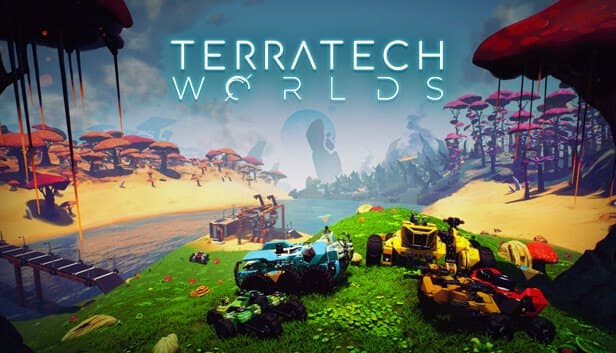
TerraTech Worlds is Payload Studios' open-world build-and-craft game, in Early Access since March 2024 and conceived as a spiritual successor to the original TerraTech rather than a direct sequel. On an uncharted alien planet you design vehicles called Techs from blocks, mine resources, reshape terrain with free-form terraforming tools and build automated production lines linked by conduit networks. Woodlands, acidic swamps and the snowy Arctic, lightning storms, enemy Techs and enemy bases keep things difficult.
The game keeps growing. Update 0.7 added Phaeton next to the starting planet Nibiru, and 0.8 brought Tyr, a water world of archipelagos you cross by boat. Update 0.7 also gave dedicated servers support for planet selection.
A dedicated server fixes co-op's biggest problem: the planet going offline when the host quits. A group playing at different hours joins the same world whenever it suits them, and one player's production line gets extended by another the next day. The host's PC also no longer has to run the game and the server at once.
How much RAM does a TerraTech Worlds server need?
TerraTech Worlds plans begin at Silver 6GB because 6 GB is the floor we recommend for this game. That figure is a cautious estimate based on the genre, and it already allows for the extra load Proton adds. A group of two or three on a fresh planet is comfortable on Silver.
What really grows memory is the world filling up. Explored terrain, built bases, Techs parked in the Tech Yard and out in the field, running production structures and active enemy Techs all add to the objects the server tracks. As players spread to opposite ends of the map, more regions have to stay loaded at once. When a full co-op group starts its first automated bases, Gold 8GB is the safer choice, and several bases on a months-old save point to Platinum or Diamond.
The four tiers from Silver to Diamond carry 4 vCores; Emerald brings 6 and Xtreme 12. Xtreme 32GB is far more than a TerraTech Worlds world uses, and we would rather say so than sell it. On disk, even the 60 GB of NVMe on Silver leaves plenty of room for the server files and the Proton environment.
How do you configure the server?
The core settings of a TerraTech Worlds server live in dedicated_server_config.json. Port is the port the server listens on and has to match the allocation in your panel. Password is what players type to join; leave it empty and anyone who has your address can get in. SlotCount caps the number of simultaneous players.
Edit the file with the server stopped and mind the JSON syntax: quotes, colons and commas all have to be in place. Keep the key names exactly as capitalized in the file; the developers even shipped a patch specifically fixing capitalization in this config file.
Because the server is a Windows program, it runs under Proton as TT2Server-Win64-Shipping.exe; TT2 is the game's internal codename, and you will see it throughout the file paths. Logs are written to TT2/Saved/Logs/TT2.log. When the console shows the Waiting Players line, the server is ready for connections, and if a setting does not behave as expected, that log is the first place to look.
Updates and saves: what matters in Early Access?
TerraTech Worlds is in Early Access and updates arrive often; from the 0.6 series through 0.8, almost every set of patch notes included fixes for dedicated servers, crash fixes among them. Keeping the server current is therefore about stability as much as compatibility.
A version mismatch between server and clients blocks the connection. The developers test new content on an unstable beta branch on Steam first, so if someone in your group opts into it, their client may no longer match a server on the stable release. Make sure everyone is on the same branch.
Take a panel backup before any major update. The developers remind players to back up saves in every unstable-branch announcement, and the same logic applies to your server: if a patch changes the save format or a bug damages your base, you can go back. Automatic backups run regularly in the background, but a manual backup taken right before the update means you know exactly which point you are returning to.
How do players join, and who is this server for?
Players connect from the multiplayer section of TerraTech Worlds using the server address and port shown in your panel, and enter the Password if you set one. When SlotCount is full, new players are turned away, so size it to your group.
Three kinds of groups get the most out of a dedicated server. First, friends who play at different hours, since nobody has to wait for someone else's PC to be on. Second, groups whose host struggles to run the game and the server at the same time; growing bases and enemy Techs can be a lot for one machine. Third, anyone running long projects, because a terraforming plan or factory build that spans months needs a world that is always in the same place.
Tech Snapshots uploaded to the Steam Workshop are how players share their own designs, and they need nothing installed on the server. The İstanbul location keeps driving and combat free of noticeable lag for players in Türkiye and the surrounding region.
How to Set Up a TerraTech Worlds Server
- 1
Pick a plan for your group
Silver 6GB suits two or three players; choose Gold 8GB for a full co-op group with automated bases, and Platinum or Diamond for large, long-running worlds.
- 2
Check out and let the server install
After payment the Windows server files download from Steam and the Proton environment is prepared, so a slightly longer first boot is normal.
- 3
Edit dedicated_server_config.json
Stop the server, set Password and SlotCount, confirm Port still matches your panel allocation and double-check the JSON syntax.
- 4
Start the server and watch the console
When the console shows the Waiting Players line, the server is ready; if something is off, check TT2/Saved/Logs/TT2.log.
- 5
Share the address and password
Send the IP, port and password; players connect from the multiplayer section of TerraTech Worlds, all on the same game branch.
- 6
Back up before updates
Take a manual panel backup before every major patch, so if an update changes how saves behave you can roll back in minutes.
Frequently Asked Questions
Common questions about TerraTech Worlds dedicated servers: plans, Proton, settings and updates.
How much does TerraTech Worlds server hosting cost?
Which plan should I choose?
Why does the server run through Proton?
Can I use mods or Workshop content?
How do Prospectors join my TerraTech Worlds server?
How do I change the password or player slots?
How long does setup take?
How is my world backed up?
Can an attack knock my co-op planet offline?
Can I upgrade my plan later?
İstanbul Location,
Maximum Performance
Our İstanbul datacenter runs on Ryzen 9 hardware, delivering low latency to players in Türkiye and good connectivity to Europe, the Middle East and the Caucasus.
Turkey

İstanbul
Turkey
Explore Our Other Services
Everything your project needs — from game servers to VPS, dedicated servers, web hosting and Discord bot hosting.
Connect with our community of gamers and developers
Get instant support, share experiences, and stay updated with the latest news
