 Colony Survival Server Hosting
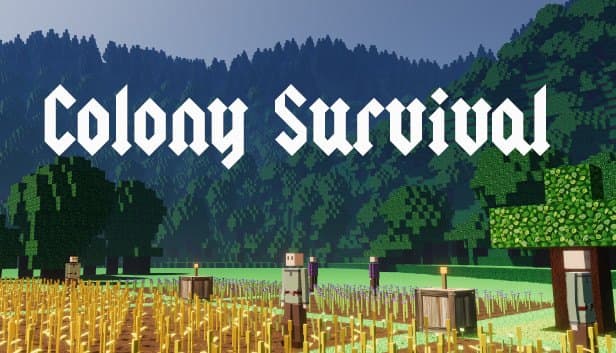
Grow colonies together against nightly monster waves in a Colony Survival world that stays online even when you log off.
Choose your Game Server
Select from our wide range of optimized game servers. Each server is configured for maximum performance and comes with DDoS protection.
1. Plan Type
2. Location
3. Choose Plan

Bronze 4GB
Silver 6GB
Gold 8GB
Platinum 10GB
Diamond 12GB
Emerald 16GB
Xtreme 32GB
Which Colony Survival Plan Is Right for You?
Compare recommended use, plan hardware and monthly prices.
| Plan | Recommended for | Hardware | Monthly price |
|---|---|---|---|
| Bronze 4GB | 2–5 players, early coloniesCommunity figures put typical use around 2 GB, so this covers a small group well. | 4 vCore Ryzen 9950X · 4 GB DDR5 6000MHz · 50 GB NVMe SSD Samsung 990 PRO | ₺240.00/mo |
| Silver 6GB | 5–10 players, growing coloniesComfortable memory headroom up to the default 10-player cap. | 4 vCore Ryzen 9950X · 6 GB DDR5 6000MHz · 60 GB NVMe SSD Samsung 990 PRO | ₺345.00/mo |
| Gold 8GB | 10 players, hundreds of colonistsOur pick for servers where several large colonies face night attacks at once. | 4 vCore Ryzen 9950X · 8 GB DDR5 6000MHz · 70 GB NVMe SSD Samsung 990 PRO | ₺440.00/mo |
| Platinum 10GB | Cities of thousands of colonistsExtra margin for crowded colonies and groups playing with a long draw distance. | 4 vCore Ryzen 9950X · 10 GB DDR5 6000MHz · 100 GB NVMe SSD Samsung 990 PRO | ₺530.00/mo |
| Diamond 12GB | Modded, sprawling worldsComfortable memory for worlds growing with code mods and wide explored terrain. | 4 vCore Ryzen 9950X · 12 GB DDR5 6000MHz · 110 GB NVMe SSD Samsung 990 PRO | ₺617.50/mo |
| Emerald 16GB | Public community server6 vCores give CPU room on busy servers with a raised player cap. | 6 vCore Ryzen 9950X · 16 GB DDR5 6000MHz · 120 GB NVMe SSD Samsung 990 PRO | ₺840.00/mo |
| Xtreme 32GB | More than most servers need12 vCores and 32 GB; usually far beyond what a single Colony Survival world uses. | 12 vCore Ryzen 9950X · 32 GB DDR5 6000MHz · 200 GB NVMe SSD Samsung 990 PRO | ₺1520.00/mo |
Why TheCrewHost for Colony Survival?
Infrastructure chosen for the load that builds up as colonists, monsters and worlds grow in Colony Survival.
Power for Crowded Colonies
Every colonist's job and route and every monster marching in at night is calculated on the server, and the Ryzen 9 9950X helps keep cities of hundreds of colonists stable.
server.config.json Control
Edit ServerName, ServerPassword, MaxPlayerCount, MaxDrawDistance and NetworkType in the file manager, and set world creation options in the NewOptions section.
Remote Admin via RCON
Set an RCONPassword to send commands to the server without joining the game, and pair it with the panel console to manage your world from anywhere.
Mods with modInfo.json
Upload JSON content mods and code mods with a .NET assembly over SFTP; the compatibleversions field stops incompatible mods from loading by accident.
World Backups
On top of the game's own saves, the panel takes regular automatic backups, so even a brutal night that flattens the colony can be rolled back.
Around-the-Clock Support
Mod conflicts, a world that will not load or a server missing from the list: reach our team 24/7 by ticket, Discord, WhatsApp, phone or live chat.
Colony Survival server hosting at TheCrewHost is priced from ₺240.00 ($6.00) per month, and the 7 plans spanning 4 GB to 32 GB all run a Ryzen 9 9950X with DDR5 memory and NVMe SSDs. Your server runs Pipliz's official dedicated server software, and you control the world name, difficulty preset, player cap, draw distance and RCON password directly in server.config.json. You can add your own mods using the modInfo.json structure. The hardware is in İstanbul, so players in Türkiye run their night defenses with low latency. As colonist counts climb from hundreds into the thousands, CPU load rises with them, and you can upgrade whenever your colonies outgrow the plan.
What happens on a Colony Survival server?
A Colony Survival server is a shared voxel world where players build colonies together or side by side. Every colony starts with a banner; players recruit colonists, place job blocks to turn them into woodcutters, farmers, miners or guards, and generate science to unlock new technology.
The nights set the pace. When darkness falls, monsters advance on the colony, and guards, walls and a well-planned layout have to hold the line. Attacks grow stronger as the colony grows, so expansion always brings more defensive responsibility.
On a multiplayer server each player can run a colony of their own or work on the same one with friends. With your own server the world stays online while you are away, and friends drop in on their own schedule to help out. Decisions like the difficulty preset, monster settings and player cap are entirely yours.
How much RAM does a Colony Survival server need?
According to the community wiki, the Colony Survival dedicated server typically uses about 2 GB of RAM and two cores, which makes the Bronze plan with 4 GB a comfortable start for a small group. What really drives the requirement, though, is how large the colonies become.
More colonists means more work for the server every moment: each colonist's job, route and needs are tracked. Because night attacks scale with colony size, big colonies also bring more monsters and more pathfinding for the CPU to handle. On a server where several players each run a large colony, that load multiplies.
Draw distance matters too, since MaxDrawDistance affects how much of the world is sent to players. Our practical advice: Bronze for groups of 2 to 5, Silver or Gold for servers approaching the default 10-player cap, and Platinum or above for cities with thousands of colonists. Every plan runs the same Ryzen 9 9950X, with 4 vCores from Bronze to Diamond, 6 on Emerald and 12 on Xtreme.
What is inside server.config.json?
The current Colony Survival dedicated server configuration lives in server.config.json, split into two main sections. Stop the server before editing and watch the JSON syntax, because one missing comma can stop the server from starting.
The NewOptions section handles world creation. WorldName is the world's name, and if a world with that name already exists the server loads it instead of creating a new one. Seed controls world generation. DifficultyKey picks one of the difficulty presets defined in gamedata/settings/server.json, and DifficultyIsLocked decides whether difficulty can be changed later.
The ServerSettings section defines the server's identity and network behavior. ServerName is the name in the list, ServerPassword gates entry, and MaxPlayerCount defaults to 10. MaxDrawDistance caps view distance. NetworkType stays on SteamOnline for public play. ServerListPublicly, ServerListLAN and ServerListFriends choose which lists the server appears in. RCONPassword enables remote administration, and UseVAC controls Valve Anti-Cheat checks.
How do you install mods on a Colony Survival server?
Colony Survival mods are folders with a modInfo.json file at their root. That file defines the mod's name, description, version and dependencies. Some mods add content purely through JSON files, while others use the dllpath field to load a .NET assembly and change the game's behavior in code.
For a server admin, the key field is compatibleversions. It lists the game versions a mod supports, and if the current version is not covered, the mod simply does not load. So if some mods quietly switch off after a big game update, this is the first place to look. A mod with marksgamemodded enabled flags the server as modded once it loads successfully.
Upload mod folders with the panel's file manager or over SFTP. Always back up before adding or removing a mod on a running world; mods that add new block or job types in particular can leave missing content behind when removed.
How do players join, and how is the world protected?
Players find your server by name in the server list in Colony Survival's multiplayer menu and join. With ServerListPublicly on, the server appears in the public list, and ServerListFriends lets Steam friends find you through rich presence. Once ServerPassword is set, every player sees a password prompt when joining.
The server and players must be on the same game version, so when the game updates, the server files need updating as well. If you are not sure how to do that, message our support team. World saves are kept in the gamedata/savegames folder and can be downloaded to your PC with the file manager or over SFTP.
The panel's automatic backups run independently of the game's own saves, and a manual backup before a big update or a mod change is a good habit. With the server in İstanbul, players in Türkiye connect with low latency, and friends across Europe, the Middle East and the Caucasus usually get a good connection. That consistency pays off when you are placing guards in the middle of a night defense.
How to Set Up a Colony Survival Server
- 1
Pick a plan that matches your group
Bronze 4GB covers a group of 2 to 5; if you will approach the default 10-player cap or plan huge colonies, go with Silver or Gold.
- 2
Pay and let installation start automatically
Once payment is confirmed, the Colony Survival dedicated server files install on their own, and you reach your server through gamepanel.hostingmerkezi.net.
- 3
Define your world in server.config.json
Stop the server and set WorldName, Seed and DifficultyKey under NewOptions; if a world with that name exists, the server loads it.
- 4
Set the server identity and security
Fill in ServerName, ServerPassword, MaxPlayerCount and RCONPassword under ServerSettings, and leave ServerListPublicly on if you want to be publicly listed.
- 5
Upload mods over SFTP if you want them
Upload mod folders containing modInfo.json and check that compatibleversions covers the current game version.
- 6
Start the server and invite players
Confirm in the console that the world loads cleanly; friends then find your server in the multiplayer list and start their own colonies.
Frequently Asked Questions
The questions people ask most about renting and running a Colony Survival server.
How much does Colony Survival server hosting cost?
Which plan should I choose?
When will my server be ready?
How do my friends connect?
Can I use mods?
I changed WorldName but my old world opened. Why?
How is my world backed up?
Is my server protected against DDoS attacks?
Our colonies have grown. Can I upgrade?
İstanbul Location,
Maximum Performance
Our İstanbul datacenter runs on Ryzen 9 hardware, delivering low latency to players in Türkiye and good connectivity to Europe, the Middle East and the Caucasus.
Turkey

İstanbul
Turkey
Explore Our Other Services
Everything your project needs — from game servers to VPS, dedicated servers, web hosting and Discord bot hosting.
Connect with our community of gamers and developers
Get instant support, share experiences, and stay updated with the latest news
