 Voyagers of Nera Server Hosting
A persistent 10-player Voyagers of Nera world where your ship waits in the harbor and your island base is ready whenever the crew sets sail.
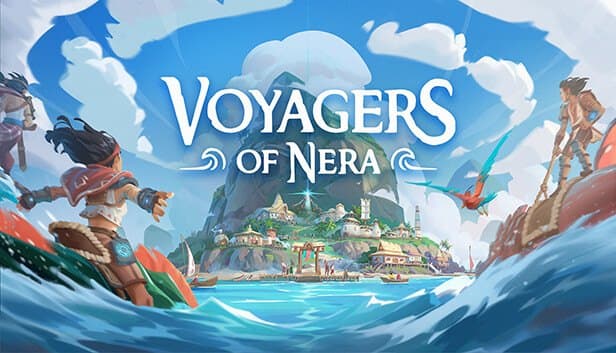
Choose your Game Server
Select from our wide range of optimized game servers. Each server is configured for maximum performance and comes with DDoS protection.
1. Plan Type
2. Location
3. Choose Plan

Bronze 4GB
Silver 6GB
Gold 8GB
Platinum 10GB
Diamond 12GB
Emerald 16GB
Xtreme 32GB
Which Voyagers of Nera Plan Is Right for You?
Compare recommended use, plan hardware and monthly prices.
| Plan | Recommended for | Hardware | Monthly price |
|---|---|---|---|
| Bronze 4GB | 2–4 playersA solid start for small crews and fresh worlds; move to Silver as bases grow. | 4 vCore Ryzen 9950X · 4 GB DDR5 6000MHz · 50 GB NVMe SSD Samsung 990 PRO | ₺240.00/mo |
| Silver 6GB | 5–10 playersComfortable up to the 10-player cap and our recommended tier for most full crews. | 4 vCore Ryzen 9950X · 6 GB DDR5 6000MHz · 60 GB NVMe SSD Samsung 990 PRO | ₺345.00/mo |
| Gold 8GB | 10 players, big multi-island basesFor full crews on long campaigns with a widely explored world and scattered bases. | 4 vCore Ryzen 9950X · 8 GB DDR5 6000MHz · 70 GB NVMe SSD Samsung 990 PRO | ₺440.00/mo |
| Platinum 10GB | 10 players, extra headroomThe player cap is fixed at 10, so this is more than most crews need, but a comfortable buffer. | 4 vCore Ryzen 9950X · 10 GB DDR5 6000MHz · 100 GB NVMe SSD Samsung 990 PRO | ₺530.00/mo |
| Diamond 12GB | More than this game needsWith a 10-player cap, the extra RAM brings no noticeable performance gain. | 4 vCore Ryzen 9950X · 12 GB DDR5 6000MHz · 110 GB NVMe SSD Samsung 990 PRO | ₺617.50/mo |
| Emerald 16GB | More than this game needs6 vCores and 16 GB; a single Voyagers of Nera server will not use these resources. | 6 vCore Ryzen 9950X · 16 GB DDR5 6000MHz · 120 GB NVMe SSD Samsung 990 PRO | ₺840.00/mo |
| Xtreme 32GB | Not recommended, excess resources12 vCores and 32 GB are unnecessary for a 10-player server; Gold or below is enough. | 12 vCore Ryzen 9950X · 32 GB DDR5 6000MHz · 200 GB NVMe SSD Samsung 990 PRO | ₺1520.00/mo |
Why TheCrewHost for Voyagers of Nera?
Built around the two ini files that shape a Voyagers of Nera server and the frequent Early Access patches.
Full access to both ini files
Server identity lives in CustomHostUserSettings.ini and gameplay rules in CustomGameUserSettings.ini; edit either in the file manager and restart.
Progression paced for your crew
GatheringRateMultiplier and XPGainRateModifier speed up resource gathering and experience, giving busy groups a smoother voyage.
A password-locked crew
HostServerPassword keeps the server to your crew, and HostServerDisplayName sets the name shown in the server list.
Autosave on your terms
AutosaveTimerSeconds decides how often the world saves, and NVMe SSD storage keeps write times short even with frequent saves.
Ready for Early Access patches
Patches arrive often while the game is in Early Access; update the server from the panel to match your players, with a backup ready beforehand.
Support at any hour
If a setting is not behaving or the server will not start after an update, reach us by ticket, Discord, WhatsApp, phone or live chat, day or night.
Voyagers of Nera server hosting at TheCrewHost starts at $6.00 per month (₺240.00) and gets you a dedicated server that installs automatically after payment and stays up 24/7. Treehouse Games' ocean survival game entered Early Access in September 2025 and supports up to 10 players per server, and yours runs on a Ryzen 9 9950X with NVMe SSD storage in İstanbul. Use CustomHostUserSettings.ini for the server name, password, player cap and autosave interval, and CustomGameUserSettings.ini for gathering rates, XP gain and enemy damage. Even if your crew plays at different times, the ship and island base are always there waiting.
Why rent a Voyagers of Nera server?
In Voyagers of Nera you set sail across Nera, a magical ocean world, as Echoes descended from ancient protectors. You upgrade your ship, build bases on islands to refine resources, rescue spirits that unlock abilities and recipes, and dive underwater for rare materials. The game supports up to 10 players per server and is designed for a group of friends progressing together.
When the game is hosted from a player's PC, the world is only reachable while that player is online. On a dedicated server, the ship and island base stay put around the clock; one friend can gather resources at lunchtime while another upgrades the ship in the evening for the next voyage. Nobody has to leave their PC running overnight to keep the world open.
Treehouse Games provides its dedicated server software for free, and the game is planned to leave Early Access in 2027. That means regular content updates in the meantime, which is why being able to update the server easily after every patch matters.
What do CustomHostUserSettings.ini and CustomGameUserSettings.ini control?
A Voyagers of Nera server is managed through two config files. CustomHostUserSettings.ini defines the server itself. HostServerDisplayName is the name other players see in the server list and HostServerPassword sets the password; leave the password empty and the server is open to anyone. MaxPlayers takes a value from 1 to 10 and defaults to 10, while AutosaveTimerSeconds sets how many seconds pass between autosaves.
CustomGameUserSettings.ini carries the gameplay settings. GatheringRateMultiplier scales how much you gather, XPGainRateModifier changes experience gain, EnemyDamageMultiplier adjusts the damage enemies deal and PlayerDamageMultiplier the damage players deal. DisableEquipmentDurability turns off gear wear, and DisableDropItemsOnDeath stops items from dropping when you die.
The safest routine is to stop the server before changing settings and start it again afterwards. That way you avoid surprises such as the running server writing over your edits or a change only half applying.
How much RAM does a 10-player Voyagers of Nera server need?
Because the game caps a server at 10 players, choosing a plan is simpler than for most survival games. For a crew of two to four, Bronze 4GB is an adequate start. A full 10-player server with bases spread across several islands and a widely explored world is more comfortable on Silver 6GB or Gold 8GB.
The main factors behind memory use are how widely players roam, the size of bases and ships, and how long the session has been running. When the crew travels together on one ship the load stays low; when everyone splits up across different islands, the server handles more of the world at the same time.
Plans above Gold 8GB are usually unnecessary for this game, since the player cap is fixed at 10. Rather than paying for extra RAM, if the server feels sluggish, try restarting the session and checking the autosave interval first. The strong single-core speed of the Ryzen 9 9950X keeps things smooth when the whole crew is active at once.
How should you tune gameplay settings for your crew?
Every crew plays Voyagers of Nera at its own pace, and CustomGameUserSettings.ini lets you reflect that. For a group of adults who can only play a few hours a week, nudging GatheringRateMultiplier and XPGainRateModifier upward keeps the sense of discovery while cutting down on repetitive gathering.
Crews after a relaxed experience can switch off item loss on death with DisableDropItemsOnDeath and gear repairs with DisableEquipmentDurability. Those options help friends who are new to the game settle in without frustration.
Experienced players looking for a tougher voyage can raise EnemyDamageMultiplier and lower PlayerDamageMultiplier to make combat more dangerous. On the save side, AutosaveTimerSeconds defaults to 300 seconds and can be set anywhere from 10 to 900. A shorter interval means less lost progress after a crash, while a very short one just means unnecessary disk writes; five minutes is a sensible balance for most crews.
How do you handle Early Access updates and backups?
Voyagers of Nera is in Early Access, so patches land regularly and the server must run the same version as your players. If players cannot connect after picking up a new build from Steam, the first thing to check is whether the server is up to date; updating from the panel and restarting usually solves it.
Taking a manual backup before big content updates is a good habit. In Early Access games, new systems can occasionally change how saves are structured, and if something goes wrong you may want to roll the world back to how it was before the patch. The panel's automatic backups add another safety net and cover your settings files as well.
Players join through the in-game server list. They search for the name you set in HostServerDisplayName, enter the password if there is one and connect. Picking a distinctive server name your crew will recognize makes it much easier to find in the list.
How to Set Up a Voyagers of Nera Server
- 1
Choose a plan for your crew size
Bronze 4GB suits two to four players, while a full crew of 10 with several island bases is well served by Silver 6GB or Gold 8GB.
- 2
Wait for setup to complete
After payment is confirmed, the Voyagers of Nera server files install automatically and become available at gamepanel.hostingmerkezi.net.
- 3
Edit CustomHostUserSettings.ini
Stop the server and set HostServerDisplayName, HostServerPassword, MaxPlayers and AutosaveTimerSeconds to suit your crew.
- 4
Tune the gameplay multipliers
In CustomGameUserSettings.ini, adjust gathering, XP and damage multipliers along with item drop on death and gear durability to match your crew's style.
- 5
Start the server and call your crew
Start the server, check the console for errors, then have friends search for the server name in the in-game list and join with the password.
Frequently Asked Questions
The most common questions before renting a Voyagers of Nera server: player cap, config files, connecting and updates.
How much does Voyagers of Nera server hosting cost?
Which plan should I choose for Voyagers of Nera?
How many players can join a Voyagers of Nera server?
Can I change gathering rates and XP gain?
How do I password-protect my server?
How does my crew join the Voyagers of Nera server?
What should I do when Voyagers of Nera gets a patch?
How are Voyagers of Nera saves backed up?
How quickly will the server be ready?
Is DDoS protection included, and can I change plans?
İstanbul Location,
Maximum Performance
Our İstanbul datacenter runs on Ryzen 9 hardware, delivering low latency to players in Türkiye and good connectivity to Europe, the Middle East and the Caucasus.
Turkey

İstanbul
Turkey
Explore Our Other Services
Everything your project needs — from game servers to VPS, dedicated servers, web hosting and Discord bot hosting.
Connect with our community of gamers and developers
Get instant support, share experiences, and stay updated with the latest news
