 Aska Server Hosting
ASKA Server Hosting
Let your villagers keep chopping wood and working fields while you are offline, on an always-on Viking settlement for your four-player crew.
Choose your Game Server
Select from our wide range of optimized game servers. Each server is configured for maximum performance and comes with DDoS protection.
1. Plan Type
2. Location
3. Choose Plan

Gold 8GB
Platinum 10GB
Diamond 12GB
Emerald 16GB
Xtreme 32GB
Which Aska Plan Is Right for You?
Compare recommended use, plan hardware and monthly prices.
| Plan | Recommended for | Hardware | Monthly price |
|---|---|---|---|
| Gold 8GB | 1–4 players, early and mid-game villageMeets the 8 GB entry baseline; enough for a first settlement and a small village. | 4 vCore Ryzen 9950X · 8 GB DDR5 6000MHz · 70 GB NVMe SSD Samsung 990 PRO | ₺440.00/mo |
| Platinum 10GB | 4 players, growing villageExtra memory buffer as villager and building counts climb. | 4 vCore Ryzen 9950X · 10 GB DDR5 6000MHz · 100 GB NVMe SSD Samsung 990 PRO | ₺530.00/mo |
| Diamond 12GB | 4 players, crowded late-game villageA comfortable pick for long-running worlds with many villagers and wide exploration. | 4 vCore Ryzen 9950X · 12 GB DDR5 6000MHz · 110 GB NVMe SSD Samsung 990 PRO | ₺617.50/mo |
| Emerald 16GB | 4 players, world running 24/7Six vCores give villager AI more CPU while the world ticks without pause. | 6 vCore Ryzen 9950X · 16 GB DDR5 6000MHz · 120 GB NVMe SSD Samsung 990 PRO | ₺840.00/mo |
| Xtreme 32GB | More than ASKA needsIn a four-player game, most of these resources would go unused. | 12 vCore Ryzen 9950X · 32 GB DDR5 6000MHz · 200 GB NVMe SSD Samsung 990 PRO | ₺1520.00/mo |
Why TheCrewHost for Aska?
The hardware and tools a Viking settlement needs to keep going.
Every setting in one file
server properties.txt uses a plain key = value format, one setting per line. Open it in the file manager, edit, and restart the server to apply.
A world that keeps running
With keep server world alive set to true the village runs 24/7; set it to false and the world pauses when the server is empty, so nothing is used up while you are away.
Power for villager AI
In a large village, every villager's jobs, pathfinding and needs land on the CPU. The Ryzen 9 9950X's single-core speed carries that load smoothly.
Invasion and population control
Switch to mode = custom to set invasion difficulty, monster density, and bear and Wulfar populations, and build a threat level that suits your group's pace.
Autosave timing and backups
Use autosave style to save every 5, 10 or 15 minutes or every in-game morning, while automatic backups protect the village against surprises.
Support around the clock
Server missing from the list or a save that will not load? Our team answers 24/7 through tickets, Discord, WhatsApp, phone and live chat.
For $11.00 a month, ASKA server hosting gets you a dedicated Ryzen 9 9950X server in Istanbul, Türkiye, with plans ranging from 8 GB to 32 GB of RAM. In ASKA your settlement runs on its villagers: you assign them jobs, grow their buildings and defend the village against invasions. On your own server, turning on keep server world alive lets the world keep ticking even when nobody is connected. Every setting sits in a single plain-text file, server properties.txt, covering region, password and autosave frequency through to invasion difficulty and terrain shape in custom mode.
What does an ASKA server get you?
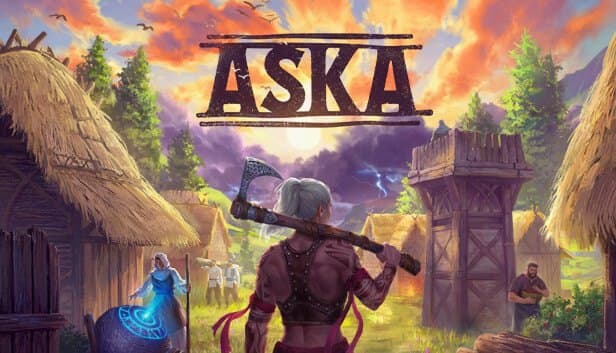
ASKA is a survival and building game where you lead a Viking tribe and grow a settlement alongside your villagers. Instead of gathering every log yourself, you assign villagers roles such as woodcutter, hunter or farmer, keep them housed and fed, and expand the village as the seasons turn. Wild animals, Wulfar tribes and invasions keep testing your defenses.
The game is built for co-op of up to four players. Normally the world runs on the host's PC, so when that person is gone, so is the village. On a dedicated server the world lives independently: one player can put up a new building in the evening while another logs in early the next morning to sort the storehouse.
In the mid and late game, the simulation gets heavier as the villager count climbs. Moving that load off a home PC that is also running the game eases both players' frame rates and how quickly villagers respond.
What is inside server properties.txt?
Every ASKA server setting lives in a plain-text file called server properties.txt, and yes, the space in the middle is really part of the filename. Each line holds one setting in key = value form, with no brackets or quotes.
display name is what shows up in the in-game session browser, while server name is an internal identifier. Leave password blank and the server is open to anyone; passwords are case-sensitive. region controls which region bucket the server is listed under, and turkey is one of the options. authentication token is the Steam game server login token (GSLT) the server needs to appear in Steam's list.
seed and save id handle world selection: an empty save id generates a new world, and a filled one loads that save. The steam game port and steam query port values are written into the file on first launch; to change them afterwards, edit the file by hand and restart.
How do you tune invasions, population and terrain in custom mode?
With mode set to normal the game uses its default balance. Switch it to custom and a set of extra options opens up. invasion difficulty sets how often and how hard invasions hit, as off, easy, normal or hard. monster density and monster population control how concentrated monsters are per area and how many exist across the world, while bear, herbivore and wulfar population set the numbers of bears, grazing animals and Wulfar tribes.
For time, day length and year length run from minimum to maximum, and starting season chooses which season the world begins in. structure decay sets how quickly buildings wear down, and precipitation sets weather intensity from 0 to 6.
terrain aspect and terrain height shape how rugged and tall the land is. Note that seed, terrain options and starting season only apply when a new world is generated; changing them on an existing save does nothing, so settle terrain with your group up front.
How much RAM does ASKA need, and which plan fits?
Our ASKA plans start at Gold 8GB. Since the game supports at most four players, memory needs are driven less by player count and more by the size of your village: more villagers, more buildings and storage, and a wider explored area all add to what the server carries.
In the early and mid game, with a few villagers and a modest settlement, Gold 8GB runs comfortably. Once the village spreads out and many villagers are moving between jobs, Platinum or Diamond gives you more buffer. With keep server world alive on, the world never rests, and Emerald 16GB with its 6 vCores sets aside extra CPU for villager AI.
Xtreme 32GB is more than a four-player game needs, and most of it would sit idle. If your needs change, you can upgrade whenever you like and take your saves straight to the new plan.
How do players connect, and how are saves protected?
Players find your server by its display name in ASKA's session browser and join from there. For the server to show up in that list, the authentication token field needs a valid Steam game server login token; if it is empty or wrong, the server can be running and friends still will not find it. Setting region to the area closest to your players also puts you in the right part of the list.
For saves, autosave style decides how often the world is written to disk: disabled, every 5, 10 or 15 minutes, or every morning in game time. Frequent saves cut down how much progress an unexpected shutdown can cost you.
On top of that come our automatic backups and any manual backups you take from the panel. We recommend one before a big game update or before making custom-mode settings harsher. To load a different save, just change save id to that save's identifier.
How to Set Up a Aska Server
- 1
Choose a plan for the size of your village
Gold 8GB covers the early and mid game; large villages and worlds that run 24/7 are more comfortable on Diamond or Emerald.
- 2
Let setup finish and open the panel
Installation starts on its own once payment is confirmed, and you reach the console, file manager and backups at gamepanel.hostingmerkezi.net.
- 3
Get a Steam game server login token
Create a GSLT on Steam's game server account management page and paste it into the authentication token field in server properties.txt.
- 4
Edit server properties.txt
Set display name, password, region, autosave style and keep server world alive, and switch to mode = custom if you want to tune difficulty.
- 5
Generate a world or load your save
For a new world, pick the seed and terrain options and leave save id empty; to continue an existing save, put its identifier in save id.
- 6
Invite your crew from the session browser
Friends find your server name in the in-game browser and join with the password; up to four players can run the village at once.
Frequently Asked Questions
Common questions before setting up an ASKA server.
How much does an ASKA server cost?
What size plan does an ASKA village need?
How many people can play on an ASKA server?
Can I install mods?
How long does setup take?
Why can't friends see my server in the browser?
How do my friends connect?
Is my village backed up?
Do I get DDoS protection, and can I move up a plan?
Should keep server world alive be on?
İstanbul Location,
Maximum Performance
Our İstanbul datacenter runs on Ryzen 9 hardware, delivering low latency to players in Türkiye and good connectivity to Europe, the Middle East and the Caucasus.
Turkey

İstanbul
Turkey
Explore Our Other Services
Everything your project needs — from game servers to VPS, dedicated servers, web hosting and Discord bot hosting.
Connect with our community of gamers and developers
Get instant support, share experiences, and stay updated with the latest news
