 Solace Crafting Server Hosting
Build a solace network and grow towns in a world that gets one level harder every kilometer, on a server that stays up while you are away.
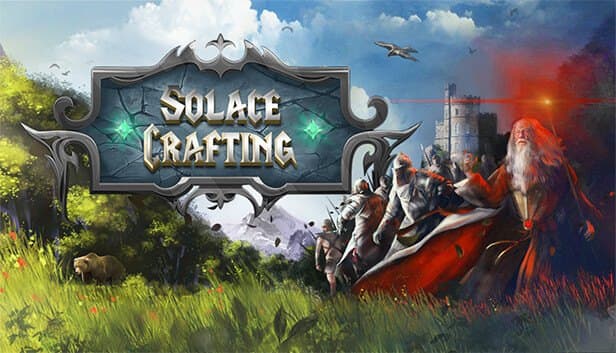
Choose your Game Server
Select from our wide range of optimized game servers. Each server is configured for maximum performance and comes with DDoS protection.
1. Plan Type
2. Location
3. Choose Plan

Bronze 4GB
Silver 6GB
Gold 8GB
Platinum 10GB
Diamond 12GB
Emerald 16GB
Xtreme 32GB
Which Solace Crafting Plan Is Right for You?
Compare recommended use, plan hardware and monthly prices.
| Plan | Recommended for | Hardware | Monthly price |
|---|---|---|---|
| Bronze 4GB | 2–4 players, fresh worldAn economical start for a small group playing near the center of the map. | 4 vCore Ryzen 9950X · 4 GB DDR5 6000MHz · 50 GB NVMe SSD Samsung 990 PRO | ₺240.00/mo |
| Silver 6GB | 4–8 players, a few townsComfortable headroom once the solace network grows and the first towns go up. | 4 vCore Ryzen 9950X · 6 GB DDR5 6000MHz · 60 GB NVMe SSD Samsung 990 PRO | ₺345.00/mo |
| Gold 8GB | 8–12 players, widely explored worldA balanced pick for active groups whose players scatter in different directions. | 4 vCore Ryzen 9950X · 8 GB DDR5 6000MHz · 70 GB NVMe SSD Samsung 990 PRO | ₺440.00/mo |
| Platinum 10GB | 12–16 players, many towns and villagersExtra memory for background villagers and busier evening sessions. | 4 vCore Ryzen 9950X · 10 GB DDR5 6000MHz · 100 GB NVMe SSD Samsung 990 PRO | ₺530.00/mo |
| Diamond 12GB | 16–24 players, community serverCarries a public community world comfortably through peak evening hours. | 4 vCore Ryzen 9950X · 12 GB DDR5 6000MHz · 110 GB NVMe SSD Samsung 990 PRO | ₺617.50/mo |
| Emerald 16GB | Very large, long-running community worldSix vCores and ample memory for worlds that have been expanding for months. | 6 vCore Ryzen 9950X · 16 GB DDR5 6000MHz · 120 GB NVMe SSD Samsung 990 PRO | ₺840.00/mo |
| Xtreme 32GB | More than most communities needOnly makes sense if you are targeting a very crowded, constantly full server. | 12 vCore Ryzen 9950X · 32 GB DDR5 6000MHz · 200 GB NVMe SSD Samsung 990 PRO | ₺1520.00/mo |
Why TheCrewHost for Solace Crafting?
In Solace Crafting the world grows with how far players roam, so we made the server easy to scale along with it.
Full control via servercfg.dat
Manage the player cap, password, private flag, admin and moderator access and the world save to load, all from a single configuration file.
Two permission tiers
Use allowAdmin and adminPassword for full administrators, and allowModerator with moderatorPassword for helpers who need a narrower set of powers.
Choose which world loads
The worldSaveToUse value decides which world the server loads. Swap the default MultiplayerWorld for another save to switch between worlds.
Headroom for far-flung players
As players push kilometers out in different directions, the server has more ground to manage. Plans from 4 GB to 32 GB let you match that load.
Ready for game updates
When the game updates, the server needs the same version. A restart brings it current so players are not locked out by a version mismatch.
Around-the-clock support
If you get stuck editing servercfg.dat or moving a world save, reach us any time through a ticket, live chat, Discord, WhatsApp or phone.
Solace Crafting server hosting starts at $6.00 (₺240.00) per month and gives Big Kitty Games' open-world fantasy survival RPG a persistent world that stays online around the clock. In this game, monsters and resources grow one level stronger for every kilometer you travel from the start, so your group decides how far it dares to go. You link up your own fast-travel network with structures called solaces, then develop towns and put villagers to work. Server settings live in servercfg.dat, where you set admin and moderator passwords, the player cap and which world save to load. Plans range from 4 GB to 32 GB of RAM on Ryzen 9 9950X hardware in İstanbul.
What do players do on a Solace Crafting server?
Solace Crafting is an open-world fantasy survival RPG, now out of early access, where you build your character across 240 skill nodes instead of picking a fixed class. Its defining mechanic is distance-based difficulty: the farther you travel from the starting area, the stronger monsters and resources become, at a rate of one level per kilometer. On a shared server, that means every player picks their own level of risk; newcomers stay close to the center while veterans organize expeditions to distant regions.
Players build bases, set up crafting stations and create a fast-travel network with teleport structures called solaces. Within a solace's power range you can develop towns and eventually summon villagers who gather resources and craft materials over time. Building supports both fast WASD placement and precise free placement.
According to the developer, multiplayer covers the vast majority of the single-player content, and dedicated servers are the recommended way to play it. Your own server gives your group a persistent world with a shared solace network and towns to develop over months.
What can you configure in servercfg.dat?
The Solace Crafting dedicated server reads its settings from a file named servercfg.dat; on Linux servers it sits in the .config/unity3d/Big Kitty Games/Solace Crafting folder. The server only reads the file at startup, so stop the server before editing; changes made while it runs do not apply until the next start.
The file holds the server name and description, the game port (27015 by default) and the Steam query port (27016 by default). For access control, isPrivate and password make the server password-protected, maxPlayers sets how many players can be online at once, and requireSteamID relates to players connecting with their Steam identity. For permissions there are allowAdmin, adminPassword, allowModerator and moderatorPassword. worldSaveToUse picks the world save to load, and autoRestart controls automatic restart behavior.
Edit the file with the panel's file manager or over SFTP. Taking a backup before larger changes lets you get back to a working config quickly if a typo keeps the server from starting.
How do admin and moderator permissions work?
Solace Crafting grants permissions by password rather than by a SteamID list. Set allowAdmin to true in servercfg.dat and write a strong, unique password into adminPassword, and anyone who knows that password can act as an administrator on the server. The same logic applies to allowModerator and moderatorPassword, which open a second tier.
Separating the two tiers pays off in community management. Administrators have broad control over the server, while moderators handle narrower tasks such as managing players. Give helpers you trust, but do not want to hand full control to, the moderator password only.
One consequence of a password system is that once a password is shared, you cannot control who ends up holding it. When someone leaves the team or you suspect a leak, change the password in servercfg.dat and restart the server. Never reuse the join password as the admin password: the join password goes to every player, the admin password goes to nobody.
How much RAM does a Solace Crafting server need?
In Solace Crafting, resource needs depend not only on how many players are online but also on how far apart they are. If everyone gathers at one base, the server manages a small area; when players push kilometers out in different directions, more regions, creatures and resources stay active at the same time. Towns and villagers working in the background add load over time as well.
So size your plan by both head count and play style. Bronze 4GB is a good start for two to four players. Silver 6GB fits four to eight players with a few towns, and Gold 8GB suits an 8 to 12 player group spread across a wide area. Busier community servers are comfortable on Platinum 10GB and Diamond 12GB, while Emerald 16GB is for large, long-running worlds with many towns. Xtreme 32GB is more than most Solace Crafting communities will ever use.
Starting small and upgrading as your players and world grow is the sensible path; your world save and settings move with you.
How do players join, and how do you protect the world?
Players find and join your server from the server list in Solace Crafting's multiplayer menu. If the server is private and password-protected, they enter the password when connecting. Because the game lists both the developer's official servers and community servers, a distinctive name and description make it much easier for friends to spot yours.
After a game update, the players' client and the server have to be on the same version. If players cannot connect, first check that the server came up on the current version; a restart usually does the trick.
A world save represents months of effort. Your server is backed up automatically, but taking a manual backup from the panel before updates and before changing worldSaveToUse is a good habit. To move a world you started on your own PC onto the server, upload its save files over SFTP and set worldSaveToUse in servercfg.dat to match that save's name.
How to Set Up a Solace Crafting Server
- 1
Pick a plan for your group size
Bronze 4GB or Silver 6GB is enough for a small group; look at Gold 8GB and up for busier servers where players spread across a wide area.
- 2
Check out and let the server install
Once your payment is confirmed, the Solace Crafting dedicated server installs automatically and is ready to manage at gamepanel.hostingmerkezi.net.
- 3
Start the server once, then stop it
The first start generates the world; then stop the server and open servercfg.dat, creating it in the same folder if it does not exist yet.
- 4
Set name, password and player cap in servercfg.dat
Use the file manager or SFTP to set the server name, description and maxPlayers, plus isPrivate and password if you want a closed server.
- 5
Define admin and moderator passwords
Enable allowAdmin and allowModerator and set strong, different passwords for each; permissions take effect when you restart the server.
- 6
Invite your players
Friends find your server name in the multiplayer menu's server list, enter the password if you set one, and join the shared world.
Frequently Asked Questions
Questions from groups who want to make their Solace Crafting world persistent.
How much does Solace Crafting server hosting cost?
Which plan should I choose?
Can I install mods?
How long does setup take?
How do players connect?
What is the difference between the admin and moderator passwords?
Can I move my local world to the server?
Are backups and DDoS protection included?
Can I upgrade my plan later?
İstanbul Location,
Maximum Performance
Our İstanbul datacenter runs on Ryzen 9 hardware, delivering low latency to players in Türkiye and good connectivity to Europe, the Middle East and the Caucasus.
Turkey

İstanbul
Turkey
Explore Our Other Services
Everything your project needs — from game servers to VPS, dedicated servers, web hosting and Discord bot hosting.
Connect with our community of gamers and developers
Get instant support, share experiences, and stay updated with the latest news
