 Smalland: Survive the Wilds Server Hosting
Keep a 10-player world of grasshopper riders and spider nests running around the clock, even when the friend who usually hosts is offline.
Choose your Game Server
Select from our wide range of optimized game servers. Each server is configured for maximum performance and comes with DDoS protection.
1. Plan Type
2. Location
3. Choose Plan

Gold 8GB
Platinum 10GB
Diamond 12GB
Emerald 16GB
Xtreme 32GB
Which Smalland: Survive the Wilds Plan Is Right for You?
Compare recommended use, plan hardware and monthly prices.
| Plan | Recommended for | Hardware | Monthly price |
|---|---|---|---|
| Gold 8GB | 2–10 players, one worldCovers the game's full 10-player cap; the right choice for most friend groups. | 4 vCore Ryzen 9950X · 8 GB DDR5 6000MHz · 70 GB NVMe SSD Samsung 990 PRO | ₺440.00/mo |
| Platinum 10GB | 10 players, lots of large basesExtra memory headroom for a months-old world packed with structures. | 4 vCore Ryzen 9950X · 10 GB DDR5 6000MHz · 100 GB NVMe SSD Samsung 990 PRO | ₺530.00/mo |
| Diamond 12GB | 10 players, very long-running worldRarely needed; worth it only if your world has grown huge and you want ample headroom. | 4 vCore Ryzen 9950X · 12 GB DDR5 6000MHz · 110 GB NVMe SSD Samsung 990 PRO | ₺617.50/mo |
| Emerald 16GB | More than needed (10-player cap)With the player cap fixed, a single Smalland server will not use this capacity. | 6 vCore Ryzen 9950X · 16 GB DDR5 6000MHz · 120 GB NVMe SSD Samsung 990 PRO | ₺840.00/mo |
| Xtreme 32GB | Not recommended for one serverNo real benefit for Smalland; we suggest keeping your budget on Gold or Platinum. | 12 vCore Ryzen 9950X · 32 GB DDR5 6000MHz · 200 GB NVMe SSD Samsung 990 PRO | ₺1520.00/mo |
Why TheCrewHost for Smalland: Survive the Wilds?
In Smalland, a server's job is to keep your tiny world reachable at any hour without depending on one player's PC.
A world that does not need a host
Instead of running the game on a friend's PC, a dedicated server keeps the world up around the clock so everyone can gather and build whenever they have time.
Difficulty through parameters
Switch peaceful mode, friendly fire, keep inventory and no deterioration on or off with startup parameters to fit the way your group likes to play.
Creature and hunger multipliers
Adjust creature health and damage, nourishment loss and fall damage as percentages to make the wilds harsher or more forgiving.
Day and season cycle
Set day length and season length in seconds. Short seasons bring weather shifts often, while long ones give you time to settle in and build.
Backups for your world save
On top of automatic backups, take a manual one from the panel; if a bad setting or a disastrous night ruins the world, roll back to the previous save.
24/7 support
Stuck on a parameter or a connection issue? Reach our support team through a ticket, live chat, Discord, WhatsApp or phone at any hour.
Smalland: Survive the Wilds server hosting starts at $11.00 (₺440.00) per month and gives your group a persistent, always-on miniature world. The game supports up to 10 players in online co-op, and because of that cap our entry plan, Gold 8GB, handles even a completely full server. You shape the world through server parameters: peaceful mode, keep inventory on death, no structure deterioration, day and season length, and creature health and damage multipliers. Your world lives on a Ryzen 9 9950X with NVMe storage in İstanbul. When the usual host shuts their PC down, the game keeps going and everyone can drop in on their own schedule.
What does a Smalland server give your group?
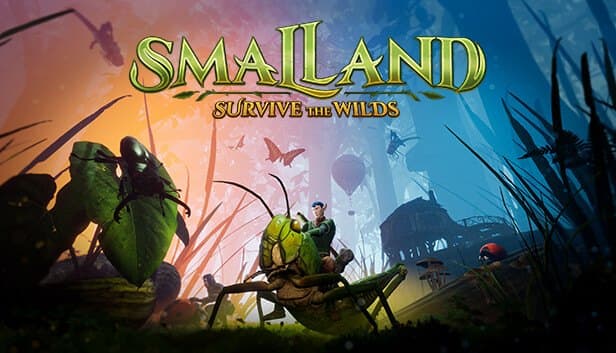
Smalland: Survive the Wilds is a co-op survival game where you play as a bug-sized human in an enormous natural world. You ride grasshoppers, damselflies and spiders, while ants, cockroaches and wasps would happily eat you. You build with material tiers that start at leaves and twigs and work up to stone, craft armor sets that grant special abilities, and adjust your preparation as seasons and weather shift.
A dedicated server makes all of that persistent. The game supports up to 10 players in online co-op, so Smalland servers are usually set up for a friend group, a small Discord community or a family. Everyone plays in the same world at different times: one person gathers in the evening, another expands the base the next morning.
Server settings let you run the same game in very different ways. Peaceful mode creates a relaxed exploration world where creatures do not attack on sight, while high damage multipliers turn every walk through the grass into a genuine risk.
How do you configure a Smalland server?
The Smalland dedicated server takes most of its settings from startup parameters rather than an editable config file. Server name, world name, password and port are the basics. The world name decides which world the save is written to, so changing it starts a fresh world.
For gameplay, the on/off options are friendly fire, peaceful mode, keep inventory on death, a no-deterioration option for structures, and a private server flag. Numeric settings change the pace of the world. Day length defaults to 1800 seconds and season length to 10800 seconds. Creature health and damage multipliers default to 100 and range roughly from 20 to 300, and nourishment loss and fall damage are also set as percentages.
For a group just starting out, a good balance is peaceful mode off and keep inventory on: creatures stay dangerous, but one death does not wipe out an evening's progress. Restart the server after changing parameters so the new values take effect.
How much RAM does a Smalland server need?
The 10-player cap makes Smalland one of the easiest games to size. Because player count cannot exceed that ceiling, memory needs stay bounded, and Gold 8GB runs even a completely full server comfortably. For most groups, that is the right plan.
There are only a few reasons to consider Platinum 10GB or Diamond 12GB: a world that has been running for months with many large bases, or simply wanting extra breathing room. Emerald 16GB and Xtreme 32GB are more than a single Smalland server can use; with the player cap unchanged, most of that capacity would sit idle. We would rather tell you what you actually need than point you at a bigger bill.
On the CPU side, creature AI and physics benefit from strong single-thread speed, which the Ryzen 9 9950X delivers. NVMe storage keeps world saves fast. If your needs change, you can upgrade at any time.
How do friends join your Smalland server?
Players join through the in-game server browser. Pick a distinctive server name and your friends can find you by typing it into the search box; using your group or Discord community name helps avoid mix-ups with similarly named servers.
If you set a password, friends enter it when they connect. A password is the simplest way to keep your 10 slots from filling up with strangers.
Most connection problems come down to version differences. When the game updates, players' clients move to the new version, and if the server is still on the old build, connections may fail. Restarting the server from the panel so it updates usually sorts this out. If the server does not show up in the browser at all, first check the panel console to confirm it started without errors, then wait a few minutes and refresh the list.
How do you protect your world save?
Weeks of work in Smalland live in a single world save, so backup habits matter. Your server is backed up automatically, and we also recommend a manual backup from the panel before starting a big build project, changing difficulty settings or applying a game update.
You do not need to delete your current world to try a different one. Change the world name parameter and the server starts a new world; switch the name back and your old world returns. That makes it easy to spin up a hardcore test world with your group while your main world stays safe.
Since you have SFTP and FTP access to your files, you can also download a copy of the world save to your own computer. If your group is taking a break for a while, that is the most reliable way to keep the world; when you come back, restore the save and pick up exactly where you stopped.
How to Set Up a Smalland: Survive the Wilds Server
- 1
Pick a plan: Gold 8GB covers most groups
With Smalland capped at 10 players, Gold 8GB runs a full server; consider Platinum 10GB only for very large, long-running worlds.
- 2
Check out and let the server install
Payment confirmed means the Smalland dedicated server sets itself up, ready for you at gamepanel.hostingmerkezi.net.
- 3
Set server name, world name and password
Enter a distinctive server name, a world name and a password to share with your group in the startup parameters; leave the port alone unless you need to change it.
- 4
Tune difficulty and world settings
Adjust peaceful mode, keep inventory, deterioration, day and season length and creature multipliers for your group, then restart the server.
- 5
Invite your friends
Friends search your server name in the in-game browser, enter the password and start surviving in the same tiny world.
Frequently Asked Questions
Questions from groups who want their tiny world online around the clock.
How much does a Smalland server cost?
How many players can join, and which plan is enough?
Can I add mods to the server?
How soon will my server be ready?
How do my friends connect?
What does peaceful mode do?
Is my world backed up?
Does a small co-op server need DDoS protection?
Can I change my plan later?
İstanbul Location,
Maximum Performance
Our İstanbul datacenter runs on Ryzen 9 hardware, delivering low latency to players in Türkiye and good connectivity to Europe, the Middle East and the Caucasus.
Turkey

İstanbul
Turkey
Explore Our Other Services
Everything your project needs — from game servers to VPS, dedicated servers, web hosting and Discord bot hosting.
Connect with our community of gamers and developers
Get instant support, share experiences, and stay updated with the latest news
